

Skip to content

See which API changes hit your code before they break it.

API maintenance and security review in one workspace. Know what your code depends on, what changed upstream, and what needs your attention.

Free. No card required.

Open web app

Sign in with GitHub in your browser, or download for macOS and Windows.

Illustrative example
Catalog APIapi.example.com
catalog.tsfetchCatalog()
checkout.tsloadProducts()
inventory.tssyncStock()
One integration. Its calling code, connected.
00 / 32s

From upstream change to a reviewable patch.Play it. Pause it. Explore each step.

A clear path from change to review.

Your repositoryConnect GitHub
Upstream changesFollow the source
Code & evidenceReview the impact
Your next stepPrepare a draft

The context you need.
The next step, made clear.

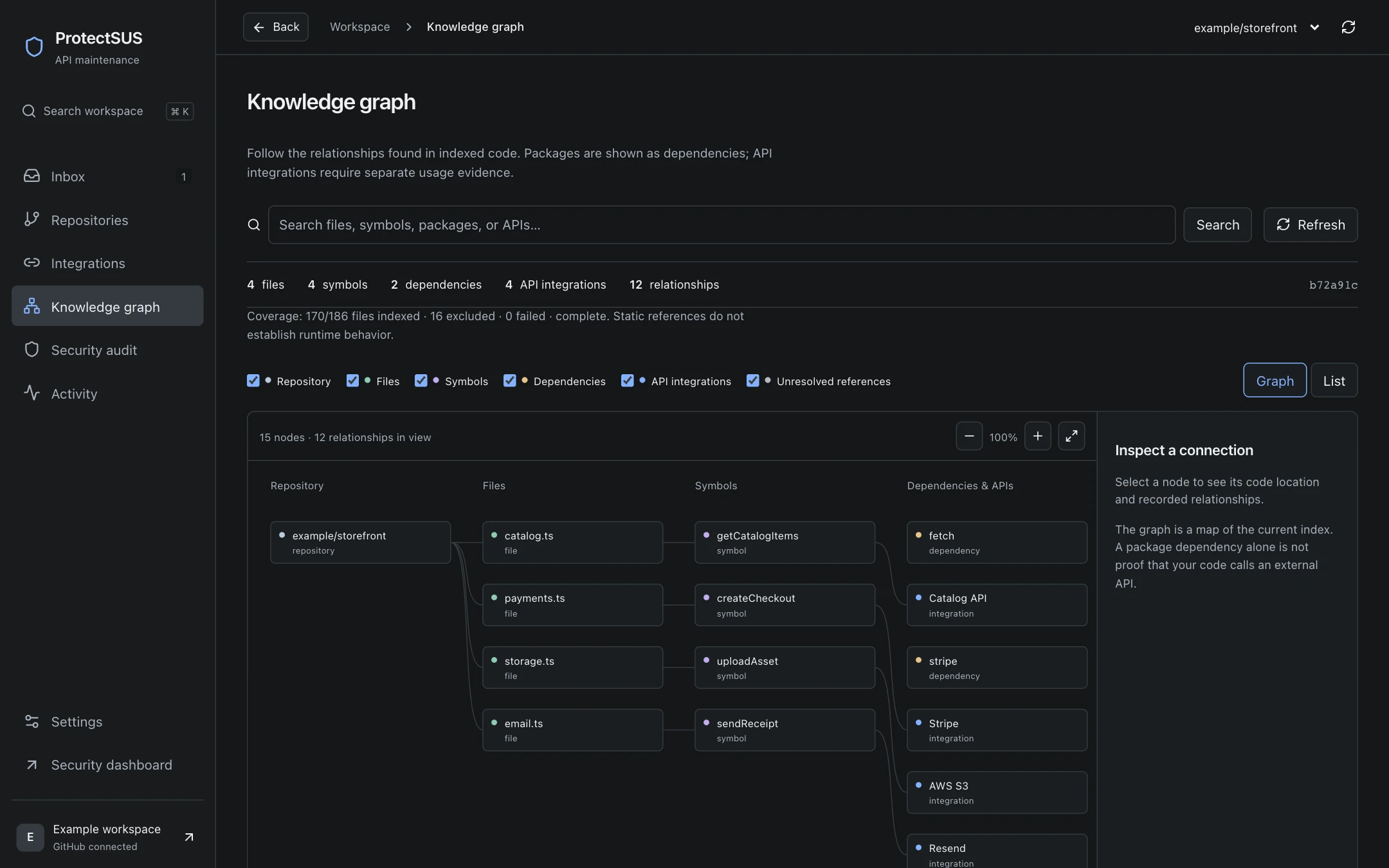
Go from a repository full of dependencies to the specific code that deserves a closer look.

Actual ProtectSUS knowledge graph with illustrative repository integrations.
Actual interface · illustrative data

Actual interface · illustrative example data

Know every API.
Find what needs you.

Bring API usage, linked sources, and code locations into one inventory. See which integrations have changed and which findings need a closer look.

Explore API maintenance
Integrations1 discovered
storefront / main
Reading repository…Indexing
IntegrationSourceCallsStatus
-Reading…
Source code stays read-only during indexingMapping call sites…
Illustrative product walkthroughPlay. Pause. Explore.

See the code behind
every connection.

Follow an integration into the files and functions that use it. Keep the source, call sites, and dependency context together as you investigate.

Explore dependency context
Dependency context
Catalog API
storefront integrations Catalog API
storefrontRepository
Catalog API4 call sites
Building repository contextResolving connections…
Illustrative product walkthroughPlay. Pause. Explore.

An upstream change.
A next step you can trust.

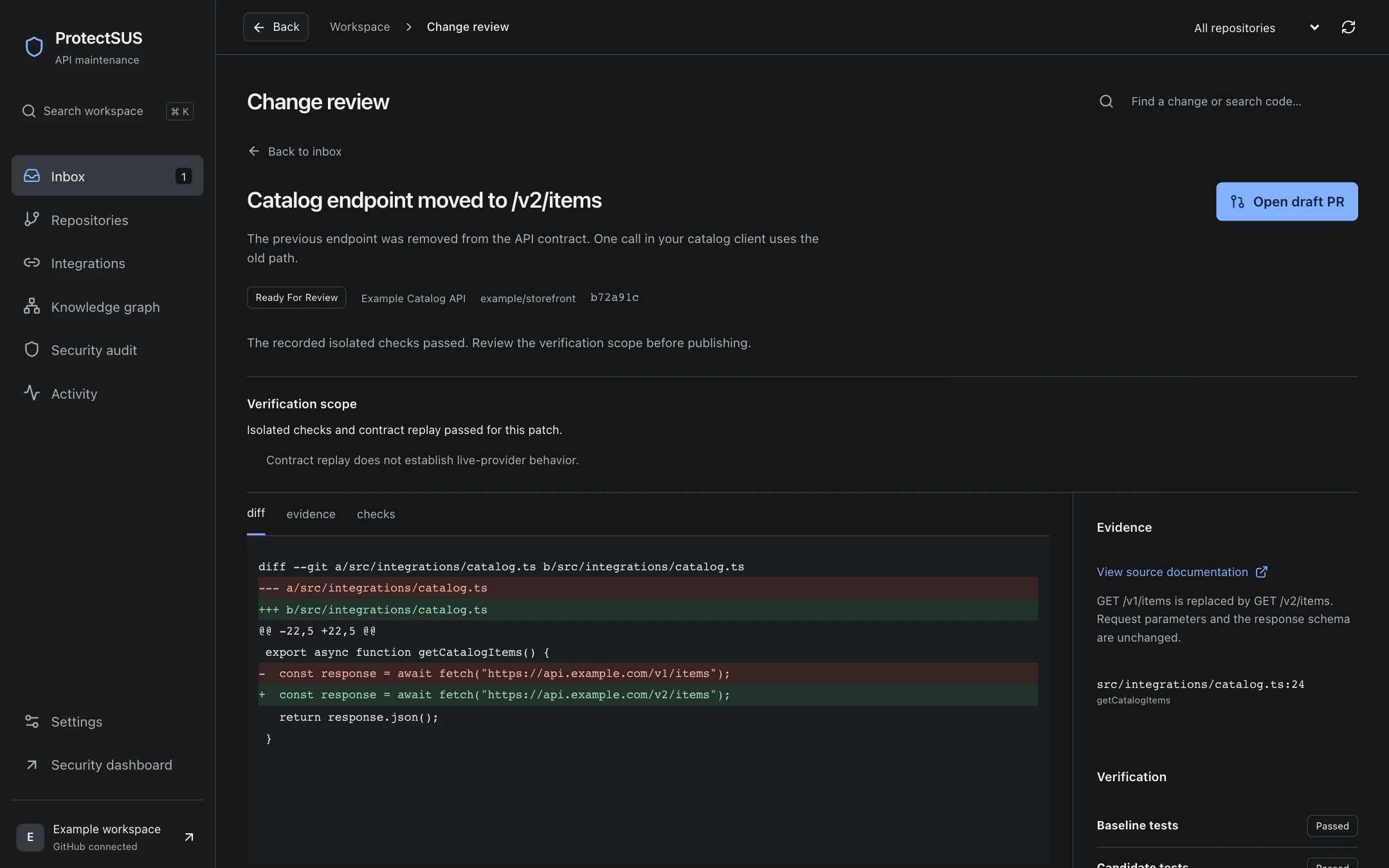
Move from a changed specification to affected code, security context, and a proposed patch. Inspect the evidence and checks before deciding what to ship.

See how you stay in control
Change review
Example activity
Following the evidence
API specification changed

Catalog API · /v2/items replaces /v1/products

Source evidence attached
Affected code identified

catalog.ts · listProducts() · line 18

Source evidence attached
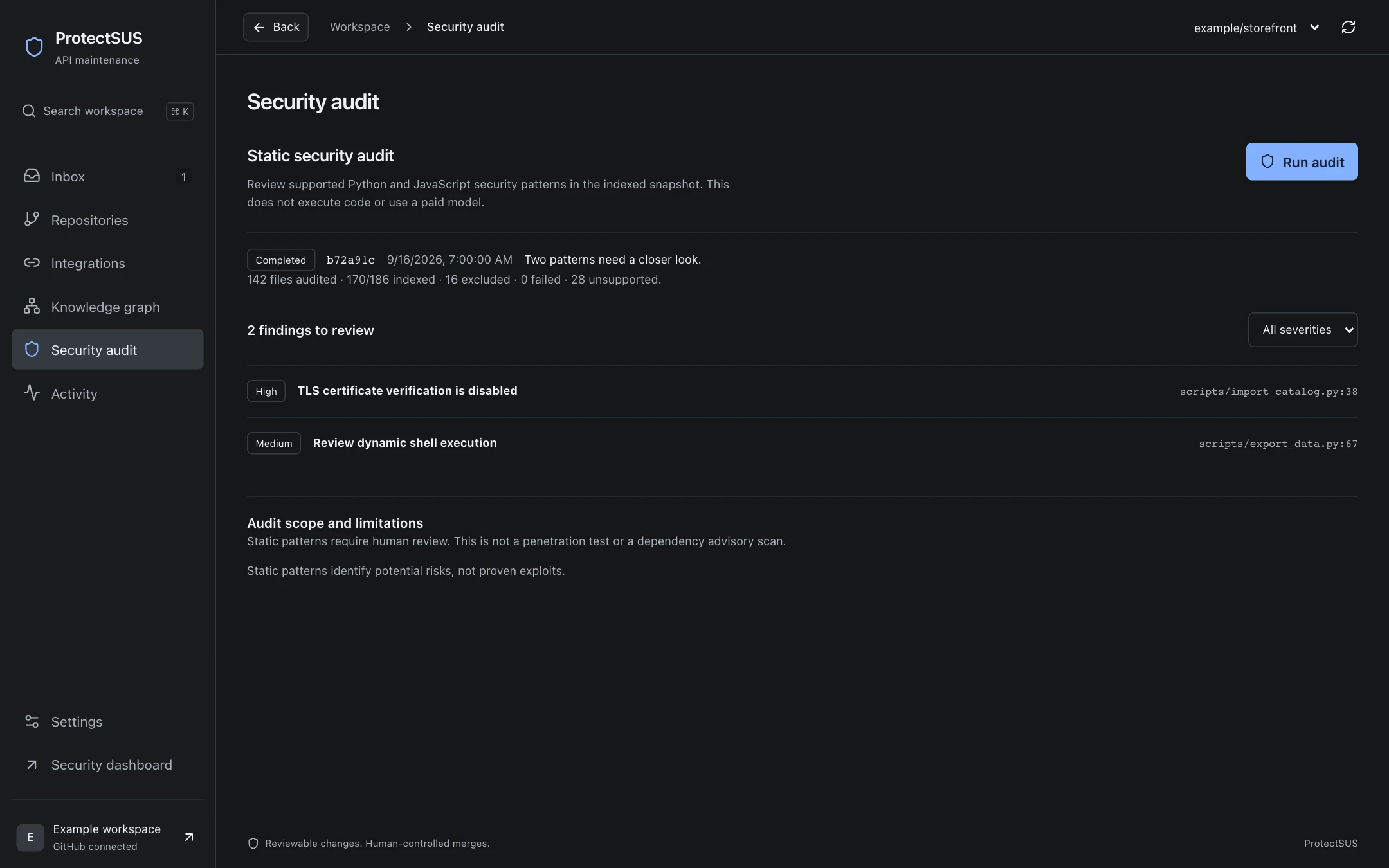
Security context attached

client.py · disabled TLS verification

Potential risk · review required
Linked sources. Specific code. A traceable decision.
Illustrative product walkthroughPlay. Pause. Explore.

Build. Protect.
Maintain.

ProtectSUS builds your API integrations, verifies them, and keeps them working as APIs evolve.

Open the workspace

Build: describe it, review a draft PR

Just say what you need, like “send an SMS with Twilio when an order ships.” A team of agents finds the official docs and OpenAPI definition, builds the integration with timeouts, rate-limit handling, safe retries and cost limits, verifies every endpoint, and opens a draft pull request.

Protect: audit every integration

Check exposed credentials, unverified webhooks, missing 429 handling, unsafe retries, missing timeouts, and idempotency. Severity and confidence are scored separately. Export SARIF for GitHub code scanning.

Maintain: stay ahead of API changes

Monitor provider documentation and changelogs, map changes to your call sites, and get repair pull requests with isolated checks before integrations break.

More confidence.
Still your call.

A suggestion is only useful when you can understand it. Inspect the source, the affected code, and the checks before deciding what to ship.

Download the desktop app

Evidence you can follow

Trace findings back to source changes and code locations. Review the diff in the same place.

Verification with clear limits

Supported repairs include isolated checks. Missing coverage and unresolved behavior stay visible.

You decide what gets merged

Start in manual mode. Choose your automation settings. Draft pull requests remain yours to review.

A few things
worth knowing.

How it works, what it checks,
and where you stay in control.

Is ProtectSUS really free?

Yes. ProtectSUS is free, with no subscription or payment card required. You can connect one active repository per account. Shared review capacity and usage limits apply. Feedback is optional; no promotion or public review is required.

What does ProtectSUS monitor?

ProtectSUS indexes connected GitHub repositories, identifies supported API usage, and monitors linked documentation and API specifications. Pushes and pull requests can trigger new assessments. Dynamic usage and incomplete coverage are reported explicitly.

Do I have to give ProtectSUS my API keys?

No. Integrate and the integration audit never ask for provider keys. Generated pull requests reference environment variable names only, and you add the values in your own host's secret manager.

Does it change or merge my code automatically?

Manual review is the default. You can choose to prepare proposals or open verified draft pull requests for supported changes. Verification gates still apply, and ProtectSUS does not automatically merge pull requests.

What does a verified patch mean?

For supported API contract migrations, ProtectSUS runs isolated checks against the precise patch and records the results. Contract replay is not a live-provider test or a guarantee of production correctness. The workspace shows what was checked and what still needs your review.

How does security review work?

The maintenance workspace checks supported Python and JavaScript/TypeScript patterns, such as disabled TLS verification and dynamic shell execution. These are potential risks for you to review, not proof of an exploit or a complete security audit.

What access do I need to get started?

Download ProtectSUS for macOS or Windows, then sign in with GitHub in the desktop app. Install the ProtectSUS GitHub App on the repositories you want to connect. Repository access is checked before connecting. Initial indexing reads source without executing repository code.

Can I control automation and model spending?

Yes. Workspace settings include monitoring controls, automation modes, and limits for paid model work. Model calls require separate consent. You can pause monitoring and review the status of queued or running tasks.

Contact us

Questions, a pilot for your team, or a walkthrough of your own repository? Book 30 minutes with the founders.

Book a meeting

Keep building.
Know what needs a second look.

Open ProtectSUS in your browser, get it for Mac or Windows, or book a meeting and walk through it with us.